
The Panda Touch can be purchased here.
Panda Touch with USB Dock: $58.74 (on sale from $69.99)
Panda Sense add-on: $13.99
Compatible with: Bambu Lab X1, P1, and A1 series
Firmware ceiling (P1S/P1P): v01.08.01.00
There’s a bigger conversation to have about Bambu Lab’s relationship with third-party hardware and what that means for products like this long-term. I covered that separately here. This review is focused on the hardware itself — what it does, how it feels to use, and whether it’s worth buying today
The problem it solves
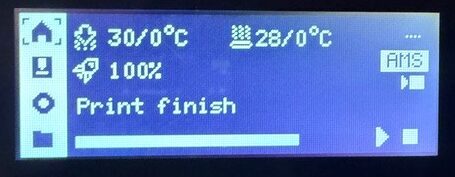
If you own a P1P or P1S, you already know the stock screen situation. It’s a small monochrome LCD — think 2001 flip phone energy — that shows you the bare minimum. Print progress, a few temperatures, some buttons. It works in the same way a flashlight works: fine until you’ve used something better, and then you can’t unsee it.
The Panda Touch is that something better. It’s a 5-inch IPS touchscreen with 800×480 resolution and 16.7 million colors, built specifically for Bambu Lab printers by BIGTREETECH. It connects over 2.4GHz WiFi, sits on a magnetic charging dock that mounts to the top of the printer and draws power from a USB port inside the frame, and runs on a built-in battery for up to 30 minutes when pulled off the dock. Setup is plug-and-play: mount the dock, connect to your WiFi, point it at the printer’s IP, done. Expect about 10-15 minutes start to finish. LAN mode needs to be enabled on the printer first, but that’s a one-time step if you haven’t already done it.
What you’re actually looking at
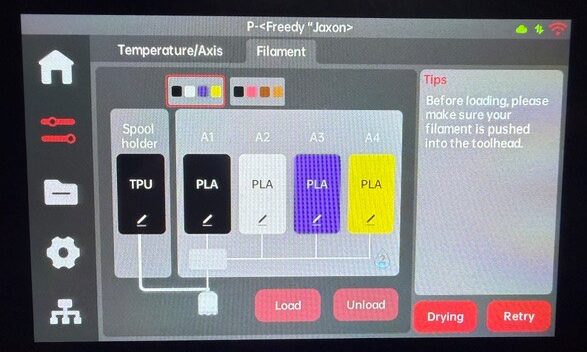
The interface is clean and immediately readable — color-coded AMS slots showing actual filament colors, live print thumbnails, real-time temperature readouts for hotend and bed, print progress with time remaining, and quick-tap controls for speed, fan, and temperature adjustments. Everything the stock screen gives you, plus the things you didn’t know you were missing until they were right there.
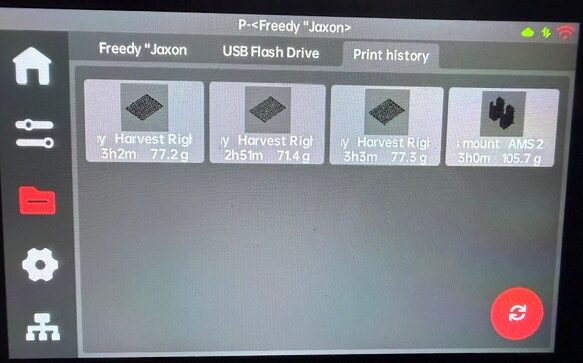
You can also print directly from a USB drive plugged into the Panda Touch’s side port, which is a genuinely underrated feature. The stock P1S uses a microSD slot that’s fine until you’re swapping files constantly — having a full-size USB-A port on the screen itself is a cleaner workflow, especially if you’re moving files from a desktop or laptop.
Over-the-air firmware updates handle themselves through a simple web interface, so keeping the Panda Touch current doesn’t require downloading anything manually or connecting cables.
The mobility angle
The detachable battery-backed screen sounds like a gimmick on the spec sheet. In practice, it’s the feature I use most. Thirty minutes of battery is enough to pull the screen, carry it to a different part of the room, check a running print, adjust something, and put it back — all without cables, reconnections, or unlocking a phone app. It’s a small workflow change that compounds every time you use it.
Multi-printer management
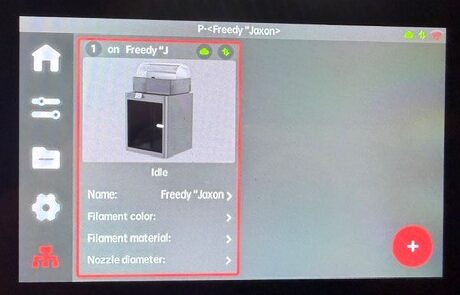
Panda Touch supports up to 10 Bambu Lab printers from a single interface. Even at two printers, having a dedicated physical screen showing you what’s happening across both machines — rather than tabbing between app sessions on a phone — is a different way of operating. You can monitor and control each printer, queue files, and manage AMS settings across machines from the same screen. Bambu Handy handles multiple printers through the app, but this is a physical always-on dashboard, and the difference is real once you’ve used it.
Panda Sense: the add-on worth getting
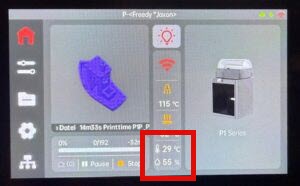
BIGTREETECH’s Panda Sense companion sensor deserves real coverage here because it meaningfully extends what the Panda Touch actually tells you. It’s a temperature and humidity sensor that mounts magnetically to the printer, plugs into the dock via a 4-pin PH2.0 connector, and puts real-time chamber readings right on the same Panda Touch screen you’re already watching. $13.99.
For anyone managing filament health (I live in Houston, the humidity fight is real) — and if you’re running AMS with multiple materials, you should be — having ambient temperature and humidity visible alongside your print status without checking a separate device is genuinely useful. You can catch humidity creeping into a range that’s going to cause stringing or poor layer adhesion before the print is already ruined rather than after.
One real limitation: Panda Sense data only displays while the Panda Touch is docked. Pull the screen to carry it around and the environmental readings disappear until you dock again. It’s a hardware connection constraint, not a bug, but it does mean you’re choosing between portability and continuous environmental monitoring at any given moment — not both simultaneously. If uninterrupted humidity monitoring matters more to you than carrying the screen around, there’s a second connection path: plugging Panda Sense directly into the Panda Touch’s onboard I2C port instead of through the dock, which keeps readings active regardless of whether the screen is docked or not, at the cost of the screen no longer being fully wireless.
The firmware ceiling — the part you need to understand before buying
Here’s where every Panda Touch review needs to be honest in a way the product listing itself is not quite direct enough about.
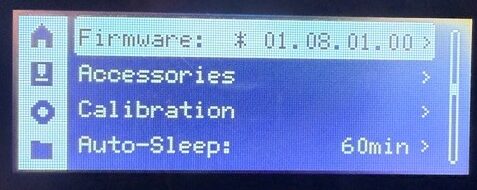
The Panda Touch has a hard firmware compatibility ceiling. For the P1S and P1P, that ceiling is v01.08.01.00. Update past that and you risk losing control functions — not just monitoring, but the ability to actually send commands to the printer. BIGTREETECH monitors Bambu’s beta firmware and sends alerts before a problematic update rolls out, and they’re explicit in their product documentation that the warranty does not cover functionality lost due to a Bambu firmware update. That risk is real and documented. One verified buyer on BIGTREETECH’s own product page reports having to downgrade from v01.10.x.x all the way back to v01.08.x.x just to get Panda Touch working again after a Bambu update. That’s not a hypothetical. That happened.
The practical impact in my own workflow: I’m intentionally sitting on firmware 1.8 because of this. Bambu fixed the ability to dry AMS filament with spools still loaded in a version past that ceiling — the feature exists, it works, I just can’t access it without potentially killing Panda Touch control functionality. Another buyer’s review on BIGTREETECH’s own store calls out the exact same frustration. This isn’t a corner case. In my case, I use Bambuddy’s drying automation to overcome this, but for those not wanting to go through the complexity of a Bambuddy/Docker setup, the ability to print and dry is lost.
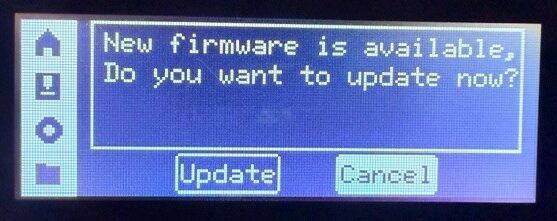
So the decision you’re actually making when you buy a Panda Touch is this: you’re choosing a hardware upgrade that meaningfully improves your daily interaction with the printer, in exchange for freezing your printer’s firmware at a fixed version indefinitely. For most stable single-printer setups, that’s a perfectly reasonable tradeoff — firmware 1.8 runs well and prints fine. For anyone who needs to stay current with Bambu firmware for other reasons, or who updates on reflex whenever a new version drops, go in with eyes fully open.
Verdict
The Panda Touch is a genuine, worthwhile upgrade at $58.74 with dock. The color IPS display alone is a significant step up from the stock P1S screen, and the portability, multi-printer support, and AMS management are all real improvements that change how you interact with the printer day to day. At $13.99, Panda Sense is a no-brainer add-on if filament moisture management is part of your workflow — which it should be if you’re running AMS with any hygroscopic materials.
The firmware ceiling is the honest asterisk on all of it, and it’s not small. But it’s a known, manageable tradeoff rather than a dealbreaker — as long as you go in knowing it exists.
Buy it if: You want a real color touchscreen, you’re running more than one printer, or you want environmental monitoring on the same display without adding a separate device.
Think twice if: You need to stay current with Bambu firmware updates and aren’t willing to freeze your printer’s software version to keep full Panda Touch functionality.